 E2B
E2B Sprites
Pair runtime and machine lane in one account. Spin up persistent workers with tools, then watch the fleet from one dashboard.
Create Workersthat keep going.
Choose a specialist. Give it a job. Your Worker keeps its memory, tools, and files—even when the machinery changes.
















The Worker system
Keep the Worker.
Swap the machinery.
Give your Worker a job. Its identity, memory, files, and schedules stay with it as you change the runtime, model, tools, or cloud provider.
Your Worker is more than a chat session.
Reduced motion
Scroll to explore the engine. Every layer connects to your Worker.

 The durable coreYour Worker
Same identity. Saved context.
Agent runtime
Sandbox provider
Models & routing
Tools & skills
Agent runtime
Choose how it works.
- Claude Code
- Codex
- Hermes
- OpenClaw
Sandbox provider
Choose where it runs.
- Daytona
- E2B
- Sprites
- Vercel
Models & routing
Connect the intelligence.
- Anthropic
- OpenAI
- Routers
- Custom API
Tools & skills
Give it the right abilities.
- Skills
- MCP servers
- CLI tools
- Connections
The Worker keeps its saved state; each provider supplies its own capabilities. Migration transfers files and restarts managed work—not live process memory.
Give it a responsibility.
Set the job, connect its tools, and define its permissions.
Run it on your terms.
Choose a runtime and provider without rebuilding the Worker.
Come back to its work.
Review saved files, logs, and results from the dashboard.
Sample fleet
A workspace for each specialist.
Illustrative activity and uptime, not live Workers or provider benchmarks. Open a card for the runtime’s documentation.

Hermes
hermes-prod · Daytona
CPU
— vCPU
MEM
— MiB
DISK
— GiB
OpenClaw
openclaw-browser · Daytona
CPU
— vCPU
MEM
— MiB
DISK
— GiB
Claude Code
claude-code-ci · Daytona
CPU
— vCPU
MEM
— MiB
DISK
— GiB


Codex CLI
codex-sandbox · Daytona
CPU
— vCPU
MEM
— MiB
DISK
— GiB
Inside the product
Configure. Run. Inspect.
Follow a Worker from its first configuration to the sessions, files, and activity you can inspect.
Recorded product views, not live status. Versions may differ.
Configure
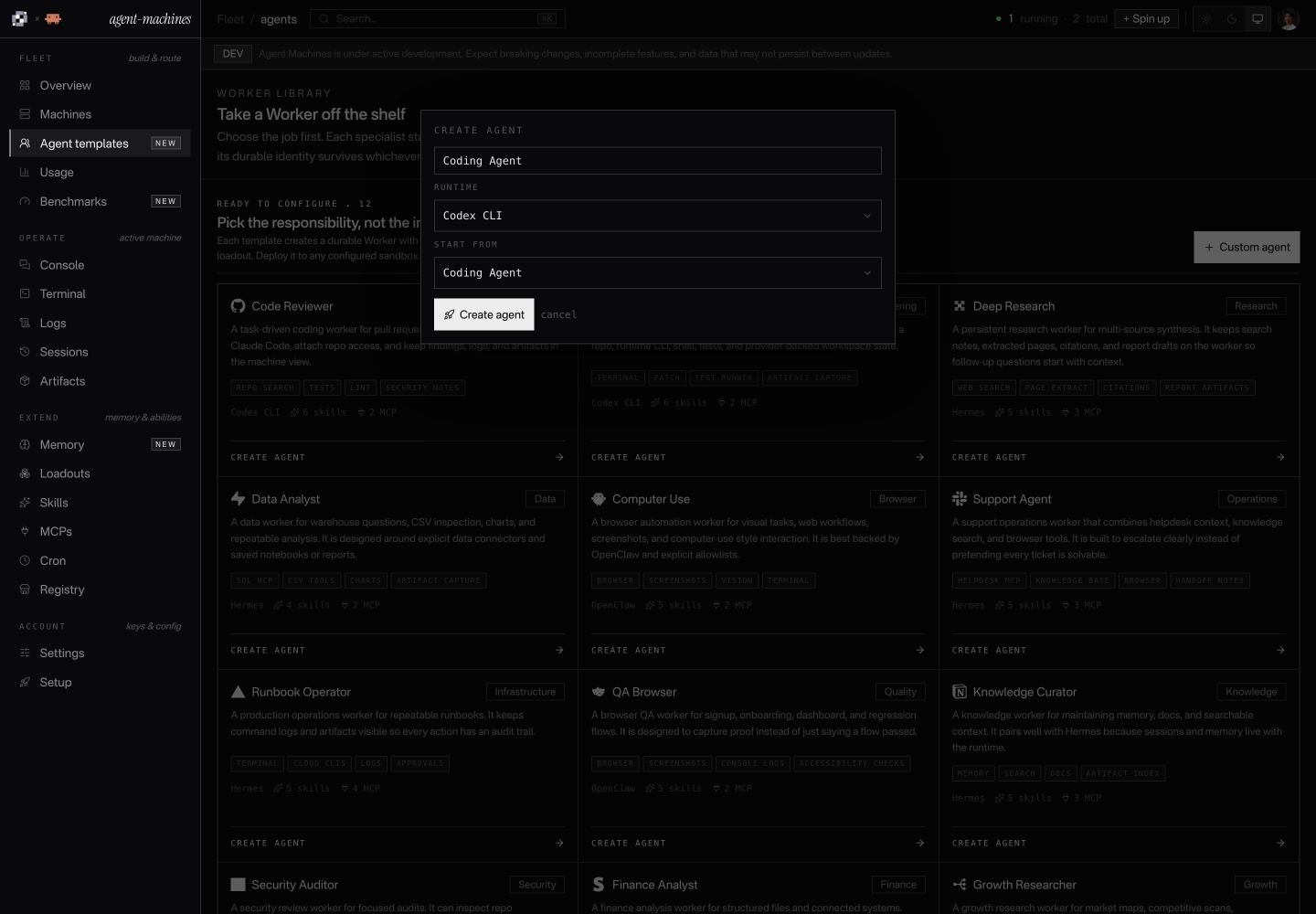
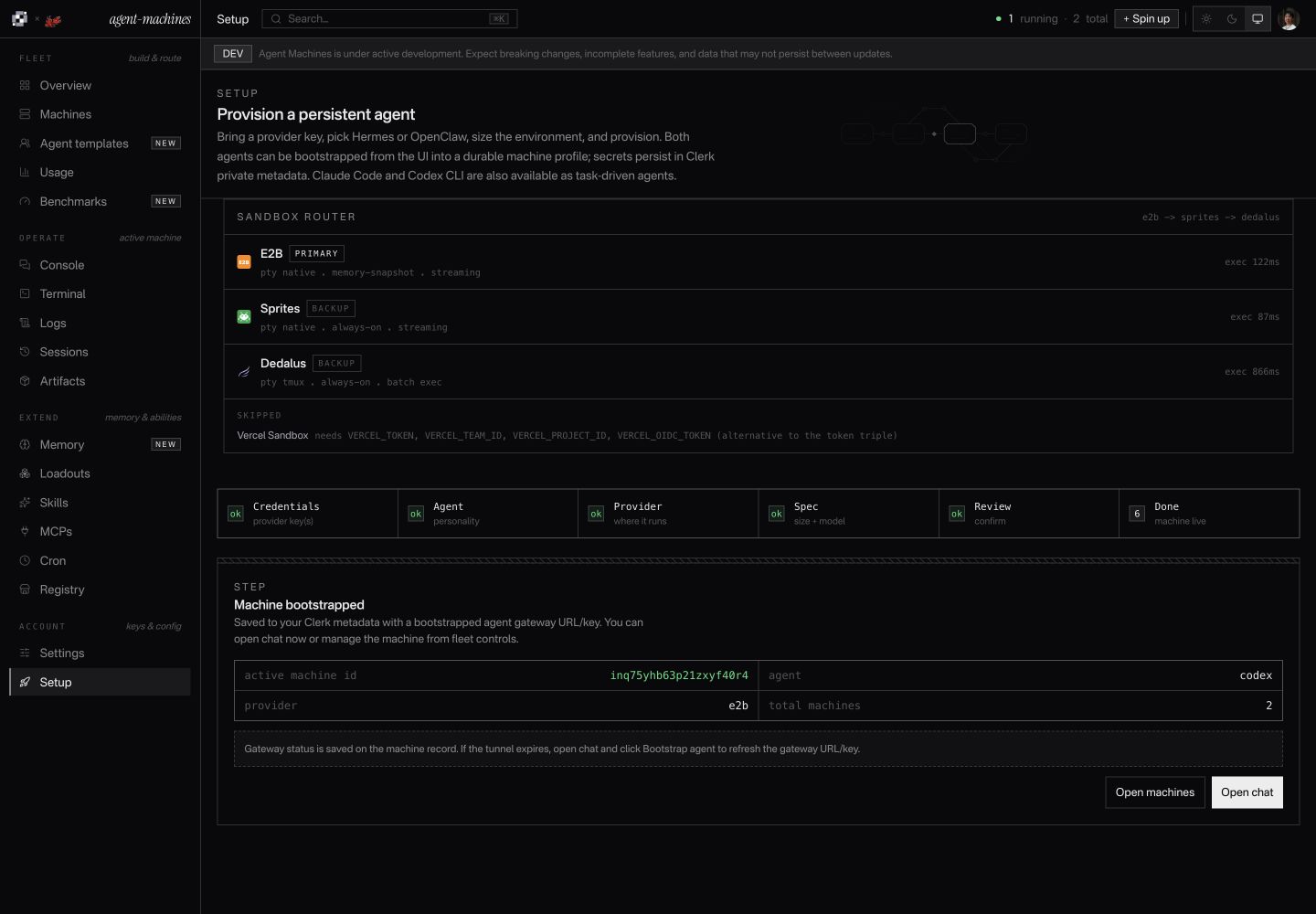
Run
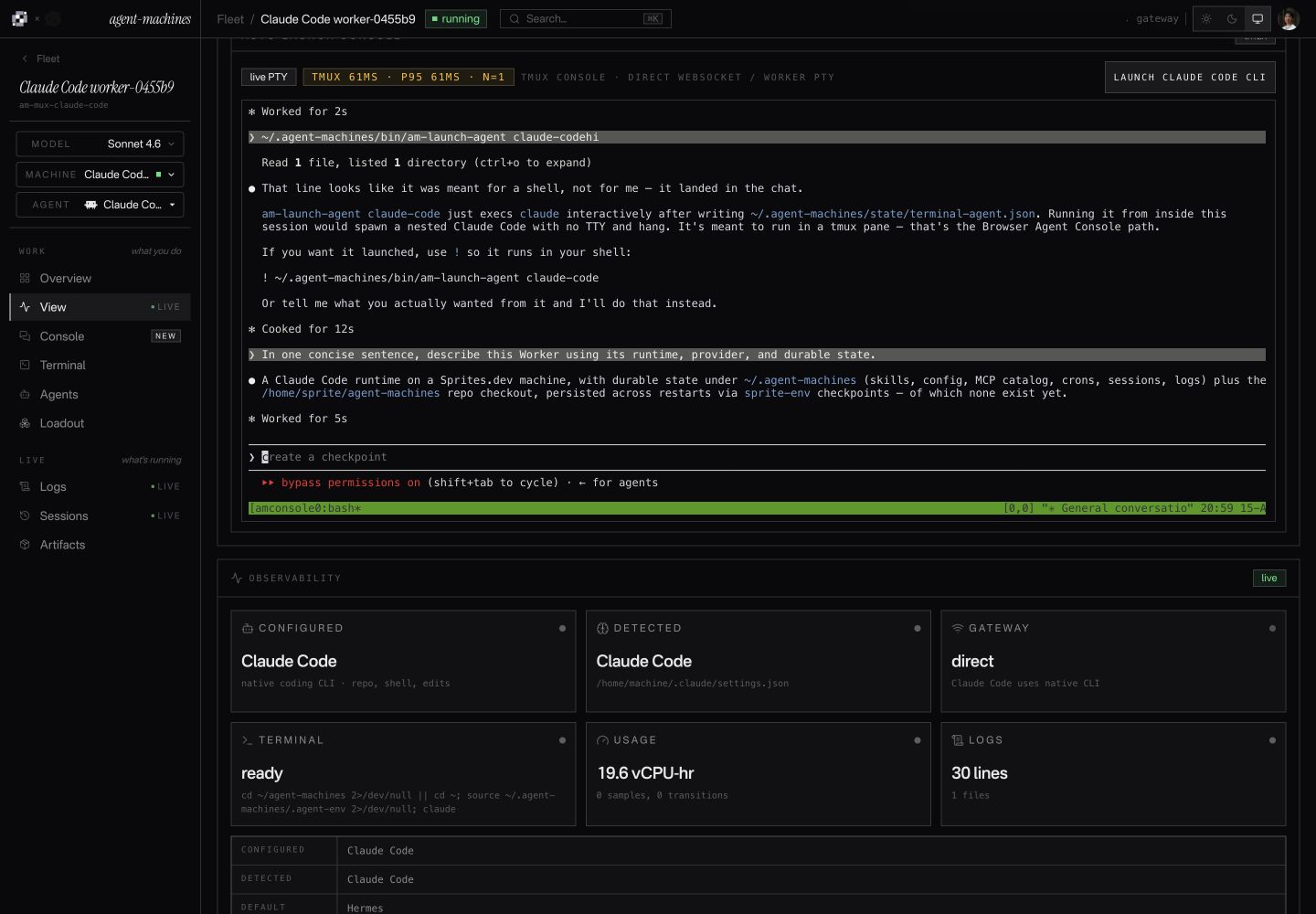
Claude Code on Sprites
View full sizeConversation, terminal, and logs in one workspace.
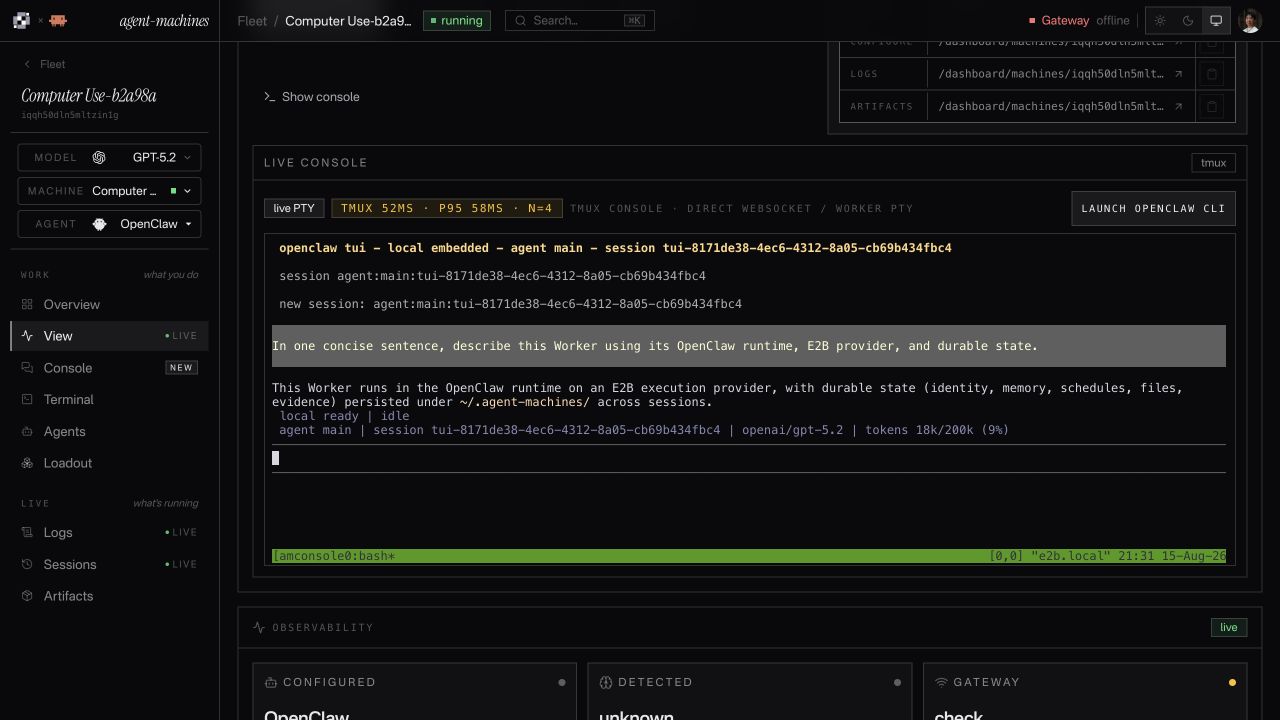
OpenClaw on E2B
View full sizeThe selected model and stored context, in the session.
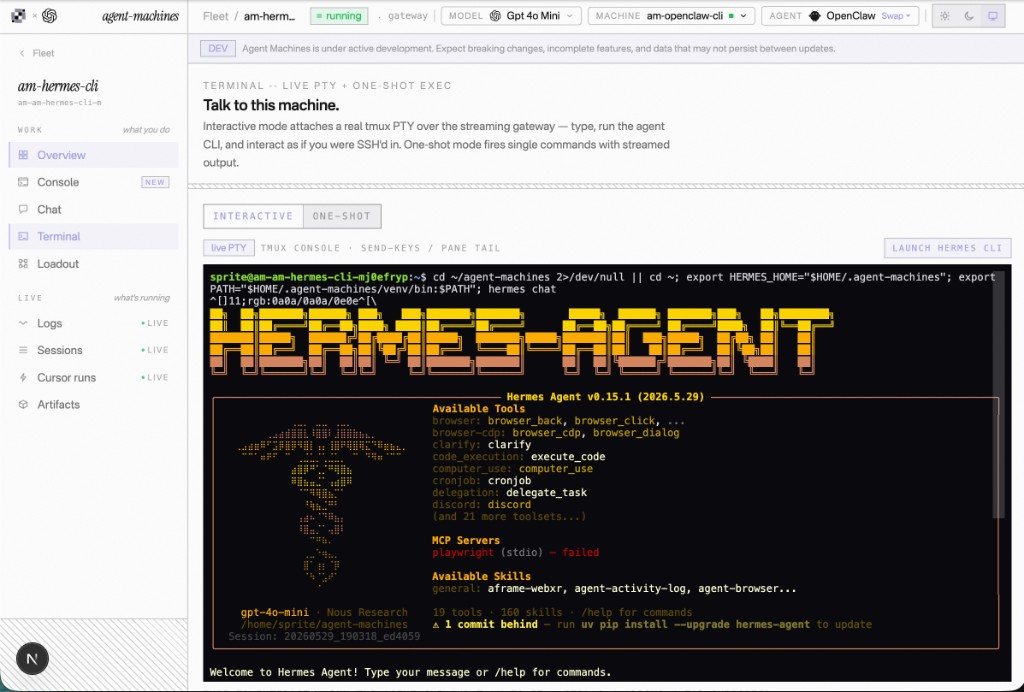
Hermes console
View full sizeThe native agent, inside your browser.
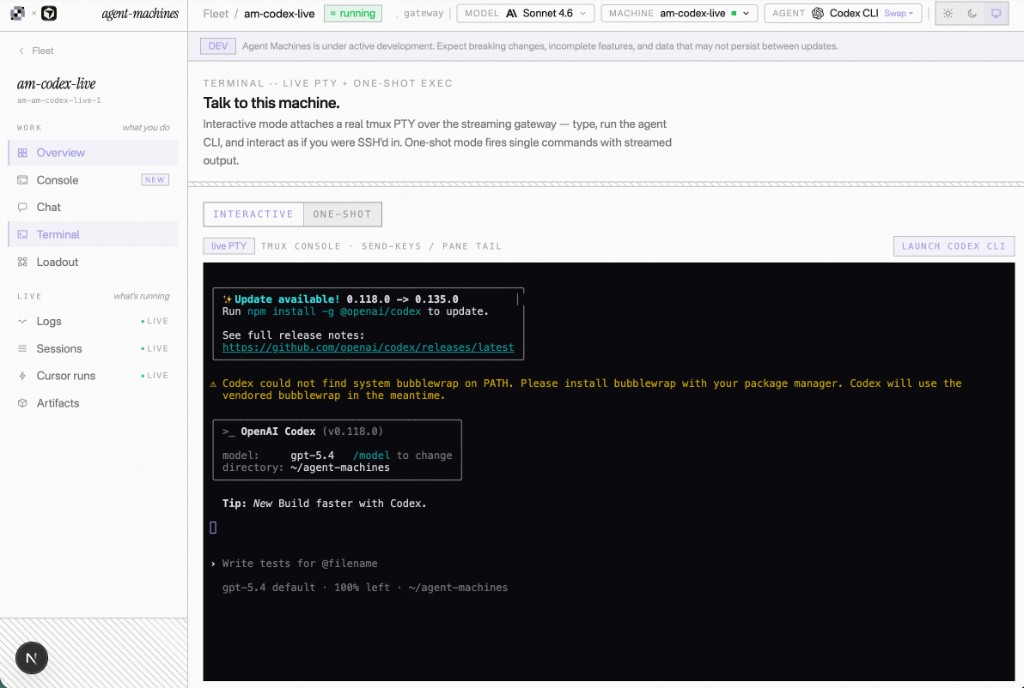
Codex CLI console
View full sizeYour project and terminal, attached to the Worker.
Inspect
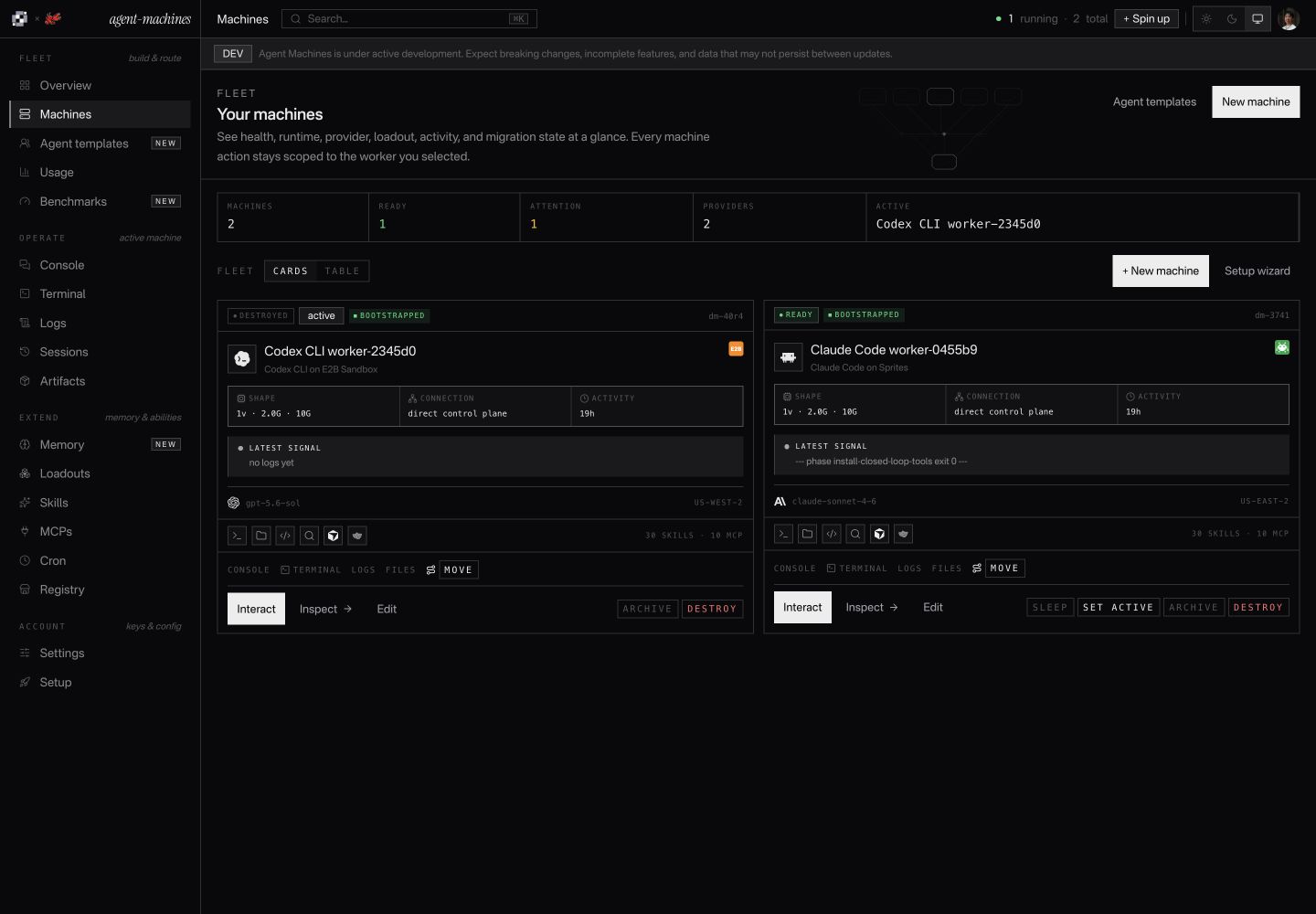
Fleet overview
View full sizeProviders, models, health, and controls—with sessions, logs, and artifacts one step away.
Worker capabilities
Build a Worker. Run a fleet.
Choose the agent. Give it tools and a place to work. Then manage its sessions, schedules, files, and activity from one dashboard.
- Agent runtimes
- 4
- Sandbox providers
- 4
- Skills
- 161
- MCP servers
- 39
Start with the job.
Choose a specialist, connect its tools, and decide how it should run.
Agent
Hermes
Model connection
OpenAI
Sandbox
E2B
Saved recipe
Research Worker
Worker recipes
Save an agent, model, memory, tools, and schedule together as a reusable specialist template.
Choose your agent
Run Claude Code, Codex, OpenClaw, or Hermes from the same dashboard.
4 agent runtimes
Choose where it runs
Launch on E2B, Sprites, Daytona, or Vercel Sandbox, with compatible backup providers for launch failures.
4 providers · Primary and backups
Connect your models
Bring native API keys, OpenRouter, Vercel AI Gateway, or a compatible custom endpoint.
Your models, your credentials
Keep work moving.
Manage the machine, schedule recurring work, and move providers when you need to.
Pause
Running
Paused
Resume
Where the provider supports it
Operation journal
- Requested
- Progress
- Result
Machine lifecycle
Launch, configure, repair, and retire a Worker through tracked operations. Pause and wake are available where supported.
Pause and resume
Pause supported machines and resume from persistent files when work is needed again.
Availability depends on the provider
Recurring jobs
Schedule prompts and commands, then inspect when they ran and what happened.
Saved schedules and run history
Move between providers
Drain managed work, copy durable files and state, then cut over while keeping the Worker's identity.
Not a transfer of running processes or RAM
Work right alongside it.
Open the real agent, follow its progress, and inspect what it produces.
codex
Summarize the notes.
Save a report.md file.
Saved session
Prompt and history
report.md
Artifact
Same Worker · linked context and outputs
A real terminal, in your browser
Use the agent's own command-line interface on the remote machine, with a terminal session you can reconnect to.
Chat and streaming commands
Send a prompt or run a command and follow output as it arrives, with streaming where supported.
Prompts, commands, and progress
Logs and sessions
Return to saved conversations, review command history, and inspect the machine's logs and activity.
Context beyond a single browser tab
Files and artifacts
Find reports, screenshots, and other outputs beside the Worker that made them. Inspect its installed runtime, too.
See the work, not just the answer
Give it the right tools.
Add repeatable procedures, connected services, and context worth keeping.
SKILL.md
Memory
Worker loadout
GitHub
Slack
Playwright
Connections require configuration and their own credentials.
Reusable skills
Give a Worker written procedures it can use again, stored as versioned SKILL.md files.
Connected tools and services
Configure MCP connections and service routes with the credentials each needs. Add Cursor delegation when available.
39 MCP servers · 27 service routes
A searchable tool catalog
Search the MCP registry, skills.sh, npm, Cursor plugins, GitHub, and URL manifests.
2,595 audited items
Memory and tool bundles
Keep instructions, agent docs, skills, and tool configuration together in a portable loadout.
Context that belongs to the Worker
See the whole fleet.
Know what's running, review activity, and compare providers using evidence.
| Worker | Agent / provider | State |
|---|---|---|
| Research | Hermes Daytona | Running |
| Build | CodexE2B | Paused |
| Review | Claude Code Vercel | Stopped |
Recorded activity. Unknown usage stays unknown.
One view of your Workers
See each Worker's agent, provider, status, tools, and recent activity without juggling separate provider dashboards.
Usage and activity
Review recorded activity and sampled compute usage. Missing measurements stay unknown; cost estimates are labeled.
Machine-level and fleet-wide views
Provider benchmarks
Compare recorded startup, resume, command latency, and compute tests across providers.
Measured results, not a speed promise
SDK, API, and CLI
Manage Workers from your own code with TypeScript, REST, and command-line tools.
Built for people and software
Keep the important parts.
Preserve context and files, scope credentials, and make recovery visible.
Account boundary
Saved credentials
Server-side
Settings
Configured
Presence, not secret values, is returned to settings.
Process memory Pause behavior is provider-dependent
Persistent files
Memory · sessions · outputs
Files and context that persist
Keep the Worker's memory, runtime files, sessions, schedules, and outputs in its persistent storage.
Scoped credentials
Check credential presence and model compatibility before launch. Saved account secrets are stored server-side, not returned in settings.
Preflight is not vendor credential validation
A record of every operation
Follow lifecycle requests through a durable journal, with recorded failures and recovery steps.
Inspect progress and failures
Know what survives a pause
See the provider's actual persistence and pause capabilities. Persistent disk does not automatically mean preserved process memory.
Capabilities stay explicit
Create the Worker in code.
Choose a runtime, configure its compute route, and inspect the result. Start with this small example, then adapt the source to your harness.
npm i agent-machines @daytona/sdk e2bimport { createMux } from "agent-machines";
// Set DAYTONA_API_KEY and ANTHROPIC_API_KEY first.
// E2B_API_KEY enables the optional backup.
const mux = createMux({
sandboxes: {
primary: "daytona",
backups: process.env.E2B_API_KEY ? ["e2b"] : [],
},
}, { selection: null }); // Use the configured route order.
const worker = await mux.create({
agent: "claude-code",
sandbox: "auto",
name: "workspace-check",
});
try {
const run = worker.run("List the files in the current directory.");
for await (const event of run) {
if (event.type === "text") process.stdout.write(event.delta);
}
const result = await run.result();
if (result.exitCode !== 0 || result.truncated) {
throw new Error("Agent run failed or was interrupted.");
}
} finally {
await worker.destroy(); // Deletes this sandbox and its files.
}Running this example creates paid compute and makes a paid model call on your accounts. Cleanup deletes the sandbox and its files.
The setup described in setup.ts. An illustration, not an active workspace.
Agent setup
workspace-check
- Agent runtime
- Claude Code
- Configured compute order
Daytona primary
E2B backup, when its key is setOnly these configured lanes are considered. Ineligible lanes are skipped; only routing-safe creation failures can try the backup.
- Before you run it
Use a Node ESM TypeScript project. Install the SDK and the provider packages shown beside the example.
Set
DAYTONA_API_KEYandANTHROPIC_API_KEY. AddE2B_API_KEYto enable the backup.- Lifecycle
- The example destroys its temporary sandbox after the task, including its files. For persistent work, choose a lifecycle policy instead. If the process stops before cleanup, check the provider account for remaining compute.
Task
List the files in the current directory.
- Inspectable TypeScript interfaces
- Explicit runtime and compute choices
- Stream events and check completion
Runtime and infrastructure
Two planes. One route.
Choose the runtime and compute independently. Provider capabilities and credentials determine which routes are eligible.
4 runtimes 4 providers
Agent runtimes
How the Worker does the job
Claude Code
Anthropic models
Codex CLI
OpenAI models
OpenClaw
Compatible model routes
Hermes
Compatible model routes
One routing decision
Credential presence
Workload compatibility
Provider health
Eligible backups
The Worker stays yours.
Sandbox providers
Where the Worker runs
- Primary
E2B
Native terminal
- Backup
Sprites
Native terminal
- Backup
Vercel Sandbox
Terminal via tmux
- Backup
Daytona
Native terminal
Primary and backup lanes are examples, not live status.
How placement works
Actual placement depends on configuration, capabilities, and provider health. Preflight checks key presence, not vendor credential validity.
Credential presence
Consider configured provider lanes.
Workload compatibility
Match the capabilities the job needs.
Provider health
Account for recent routing outcomes.
Eligible backups
Retry routing-safe creation failures.
Install the SDK
npm i agent-machines @daytona/sdk e2bConnect your accounts
DAYTONA_API_KEY + ANTHROPIC_API_KEYConfigure the route
Daytona → optional E2B backupRun, inspect, and clean up
run.result() → worker.destroy()
Sample history
A history you can inspect.
Explore six months of generated activity. This is sample data, not your Workers’ history, live uptime, or benchmark results.
Choose a day, or filter the activity below.
Agents and platforms
Services and tools
Common questions
Before your first Worker.
How Workers run, what stays with them, and how to get started.
Can I run multiple agents for different jobs?
- Yes. Save starting configurations for coding, research, browser tasks, and other workflows. Each preset suggests a runtime, instructions, and selected abilities. Connect credentials and install the tools you need before running it. One dashboard shows your machines, terminals, files, logs, and usage.
What is Agent Machines?
- Agent Machines provides open-source building blocks for agent harnesses: runtime adapters, sandbox providers, browser terminals, editable instructions and memory, skills, and MCP configuration. Start from a preset or assemble your own setup, run the actual agent CLI, and manage remote agents from one dashboard. Inspect, modify, and extend the source as your workflow changes.
How is this different from a regular chatbot?
- A regular chatbot mostly returns messages. Agent Machines gives the agent a machine record, runtime root, terminal, filesystem, logs, usage, cron schedules, sessions, artifacts, and installable tools. State lives with the worker instead of disappearing after one request.
Which agents can I run?
- Claude Code, Codex, Hermes, and OpenClaw have runtime adapters. You can use the actual native CLI in a browser terminal or use managed execution. Native tools, model paths, and session formats vary by runtime; selecting a runtime does not install every integration in the catalog.
Which providers can host the machine?
- Daytona, E2B Sandbox, Sprites.dev, and Vercel Sandbox. Daytona stop/start retains files but restarts processes; E2B supports pause/resume; Sprites manages idle suspension; Vercel resumes from filesystem snapshots. Each provider exposes only the lifecycle and terminal operations it supports. Historical benchmark results do not establish Daytona performance.
How is this different from a sandbox like E2B or Daytona?
- Those supply compute. Agent Machines adds runtime setup, editable instructions and memory, tool configuration, terminals, files, and logs. You can reuse and modify the open-source adapters instead of rebuilding this layer. Provider-specific features such as pause, snapshots, and preview URLs remain available only where supported.
How do I get my own machine today?
- Sign in and add provider and model credentials in Settings. Open Starter setups, preview a preset, and save it. Review its configuration and provision a machine when ready; saving a setup alone does not launch compute. Quick launch on the overview creates a machine directly. Compute and inference use your connected accounts.
What tools and skills can I add?
- The source includes 161 SKILL.md entries and 39 MCP catalog entries, plus CLI and service guides. These are available building blocks, not a promise that every tool is installed, authenticated, or compatible with every runtime. Preview and select abilities, connect the required services, then use the dashboard installation controls. Runtime-native tools vary by agent.
Is Cursor required?
- No. Cursor is optional delegation for code edits through cursor-bridge and @cursor/sdk. Without CURSOR_API_KEY, the rest of the machine still runs: chat, files, browser automation, closed-loop tools, skills, cron, memory, dashboard polling, artifacts, and provider lifecycle controls.
What is ~/.agent-machines?
- ~/.agent-machines holds Worker configuration, canonical memory, skills, schedules, logs, chats, and artifacts. Native runtimes also keep their own state directories. The ~ prefix means the sandbox user's home: /home/daytona, /home/user, /home/sprite, or /vercel/sandbox. Knowledge updates use ~/.agent-machines/knowledge-source, separate from the Worker's project at ~/agent-machines.
What inference providers are supported?
- Compatibility depends on both runtime and interface. The hosted dashboard uses native Anthropic for Claude Code and native OpenAI for Codex; Hermes and OpenClaw expose supported router or native-compatible paths. The direct mux SDK has a separate upstream map: Claude Code and Codex support native keys, OpenRouter, and Vercel AI Gateway; Hermes uses native Anthropic or OpenAI. An arbitrary endpoint is not guaranteed to work with every runtime.
What happens when a machine sleeps?
- The behavior is provider-specific. Daytona stop/start retains files but restarts processes. E2B supports pause/resume. Sprites manages idle suspension rather than manual sleep. Vercel uses filesystem snapshots with bounded sessions. Moving files between providers does not migrate live process memory or guarantee that a native conversation can resume unchanged.
Can I share or customize a setup?
- You can fork the MIT-licensed source, reuse direct SDK configuration files, bring your own skills, and export memory documents as Markdown. Full executable setup import/export, a public marketplace, and a copy-into-app component installer are not available yet. The shadcn analogy describes the source-first design principle, not an existing shadcn integration.
Where does my data live?
- Provider credentials and model keys are stored privately for your account. Worker configuration and history also use the hosted data store; workspace files and runtime state live in the selected sandbox user's home, including ~/.agent-machines. The public client receives redacted credential and machine status.